
The Product
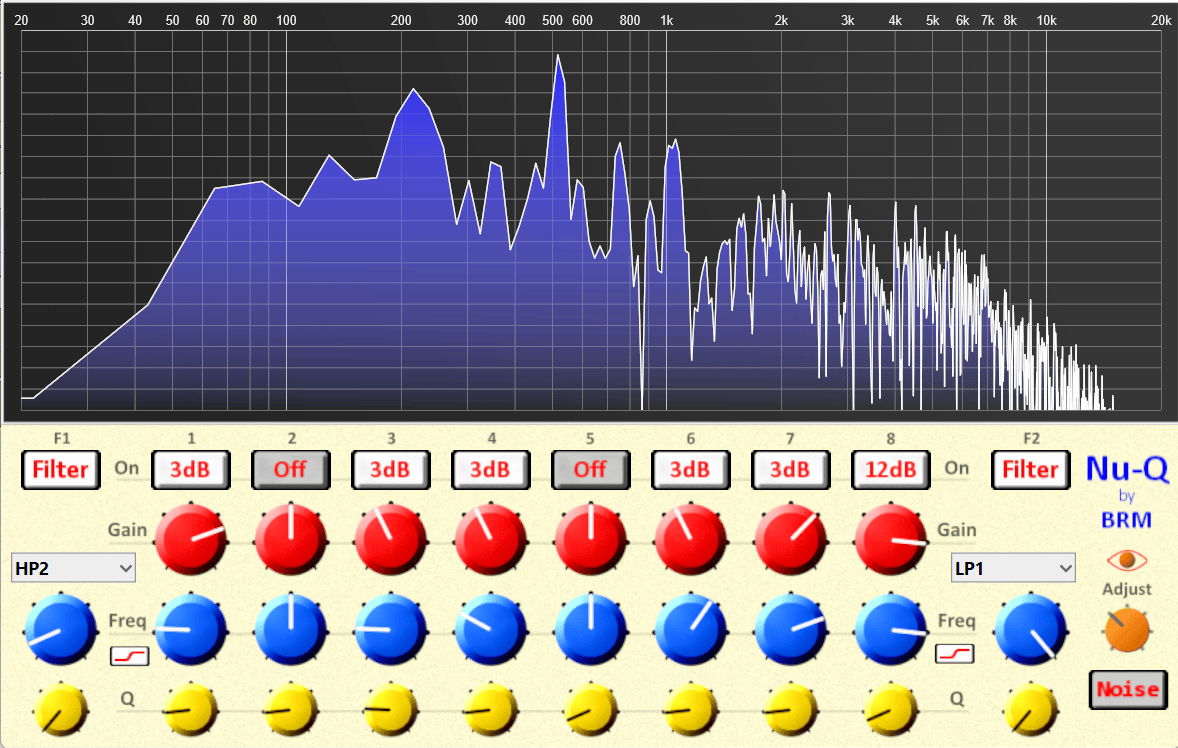
Nu-Q is a 10-band EQ and Filter Bank. There are two multi-mode filters and eight Bell-shaped EQ points, two of which are switchable to shelf mode for low and high shelves. This leaves plenty of points for any (sane) situation.
Filters can be switched in/out individually. EQ points feature range modes: Off to 48dB. This makes comparing every action easy as well as easily visible at all times. There is always an overview of what is happening – no having to click dots and open panes.
The frequency spectrum view is referred to as Eyes and can be switched in and out using the eye icon. The Adjust knob lets you adjust the level of the signal going to the view (summed mono). This is a bit different, as this sort of view is not meant for exact decision-making but general feedback. If you really need to know where your points are, you can raise the Mode + Gain for that point to create a visible spike/dip and drop back as you do the real task based on what you hear and feel (never by numbers and rules).
There is a button to switch in White Noise, which can be helpful from time to time, especially when getting a feel for how Nu-Q works. I put it there during build, then realized that it made no sense to remove it, as it can not only help new users but also be a nice noise source for those filters (saving the need for a synth).
Features
- 10 Bands – Always Visible
- 2x Filters – multi-mode with Resonance
- 2x Shelf/Peak switchable
- 6x Peak with variable depth modes
- Gain, Frequency & Q
- Eyes View
- On/Off
- Level Adjust
- Global Bypass
- White Noise Generator
- Fully Automation & Modulation ready
The whole plugin can be bypassed by clicking the Nu-Q logo.
Being automatable and modulatable, if you want movement or even dynamic EQ features, you can fly them in using your fave compression tools (and maybe a freq splitter). If you think mid/side is vital, you can make that too in most DAWs.
The Reason
EQs are really a dime a dozen these days. Most are vibe code AI-generated and come across as a me-too style of cloneware crossed with a game. Seems like a win when you think you get fun $150 tools for little to no cost. The longer that you use what I could term negative workflow devices, the more your ability to develop your craft is diminished. What happens is that you feel like you are failing and that getting even more of these negative workflow tools will solve the issue. It just digs a deeper hole.
After being frustrated, I decided that rather than asking the market to make what I need to do my work, I might as well apply the skills I already have in my main craft of mixing, along with my secondary abilities in VST creation, to make something that I feel really solves not only my personal wants and needs but what I feel the market is missing in core usability.
Demo
Demos are tricky for how I do things. My devices have no intrusive copy protections. I rely on people buying and trust. Seeing my pricing is so low, and I have free devices you can try to see if a) they work on your system and b) you dig the cut of my jib, I think there are enough options to make purchases pretty low-risk.
Support
Support is only/ever via the official YouTube video for this device. Do not PM/DM me as if you have a valid Q: others will too. One event helps all. The reality tho is that effectively no one ever asks anything that is not already covered in the video or this page.
This was built in SynthEdit and should run in any 64 Bit VST3 DAW, both Windows & Apple. IF you have issues on Windows, pop into the folder, delete the Mac Folder, and try again. Tested on Windows mostly in Reason 14, which is pretty fussy, and no apparent issues occur.
Thanks to TD & Sascha for modules that help make this device not only function but shine. And of course to Steinberg for the VST format – without which we would all be crying.